-
✅ ۱۰۰٪ اورجینال
-
✅ اپن سورس
-
✅ بدون محدودیت در نصب
-
✅ یک ماه آپدیت و بروزرسانی
-
✅ آخرین نسخه
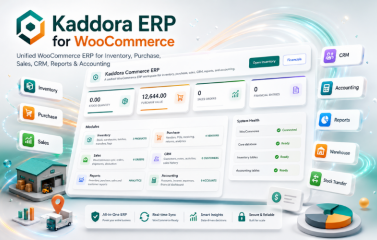
Kaddora ERP for WooCommerce Plugin
Kaddora ERP for WooCommerce is a complete WordPress-based ERP plugin for WooCommerce businesses that need to manage inventory, warehouses, purchases, sales, CRM, accounting, reporting, and daily operations from one centralized dashboard.
The plugin extends WooCommerce with ERP-style tools such as stock tracking, warehouse management, stock transfers, purchase orders, vendor records, sales workflows, customer profiles, financial transaction tracking, accounting dashboards, operational reports, and business analytics.
Plugin Overview
Kaddora ERP for WooCommerce is built specifically for WordPress and WooCommerce. It provides a modular ERP system where each business module works independently while staying connected to the WooCommerce ecosystem.
With WooCommerce synchronization, administrators can connect products, customers, orders, stock data, and store workflows with ERP modules. This allows online store activity and back-office operations to be managed from the same WordPress dashboard.
Why Choose Kaddora ERP for WooCommerce
WooCommerce is powerful for online selling, but growing businesses often need inventory control, warehouse tracking, purchase order approval, vendor management, stock movement history, CRM, accounting, and reporting. Kaddora ERP adds these business management features directly inside WordPress.
The plugin helps reduce manual work, avoid disconnected spreadsheets, improve stock accuracy, monitor purchases, manage customer data, track financial activity, and generate useful reports from one platform.
Main Features
- Complete ERP solution for WooCommerce stores
- Centralized WordPress business management dashboard
- Modular ERP architecture and native WordPress development
- Deep WooCommerce integration for products, customers, orders, and inventory
- Inventory, warehouse, and stock transfer management
- Purchase, vendor, purchase order, and purchase return management
- Sales order management and WooCommerce order workflow support
- CRM customer profiles, notes, activities, analytics, and sales history
- Accounting accounts, income, expenses, and transaction tracking
- Inventory, purchase, sales, customer, and accounting reports
- Business analytics and data export functionality
- REST API support and AJAX-powered admin operations
- Role and capability management
- Activity logging and database version management
Core Framework
The framework is designed for scalability and maintainability. Inventory, Purchase, Sales, CRM, Reports, and Accounting are separated logically while still sharing important business data.
- Modular ERP Architecture: Structured modules for scalable business management.
- WordPress Native Development: Works inside the standard WordPress admin environment.
- WooCommerce Integration: Connects products, customers, orders, stock data, and workflows.
- REST API Support: Supports API-based data access and extension possibilities.
- AJAX-Powered Operations: Improves admin workflow and reduces page reloads.
- Role and Capability Management: Helps control ERP access.
- Activity Logging: Records important ERP actions for traceability.
Requirements and Compatibility
Kaddora ERP is designed for modern WordPress and WooCommerce websites using WordPress-native architecture and WooCommerce integration points.
Minimum Requirements
- WordPress 6.0 or higher
- WooCommerce 7.0 or higher
- PHP 8.0 or higher
- MySQL 5.7 or higher or MariaDB 10.3 or higher
- JavaScript-enabled modern browser
- Administrator or Shop Manager access
Recommended Environment
- WordPress 6.5 or higher
- WooCommerce 9.0 or higher
- PHP 8.2 or higher
- MySQL 8.0 or higher
- HTTPS-enabled website
- Minimum 256 MB PHP memory limit
Compatibility
- Compatible with WordPress multisite environments
- Uses WordPress coding standards and native database architecture
- WordPress Settings API and REST API support
- WooCommerce product, customer, order, inventory, and reporting integration
Plugin Installation
- Go to the WordPress Dashboard.
- Navigate to Plugins and click Add New.
- Click Upload Plugin.
- Choose the kaddora-commerce-erp.zip plugin file.
- Click Install Now and then Activate Plugin.
- Open the Kaddora ERP menu from the WordPress dashboard.
Dashboard Admin Panel
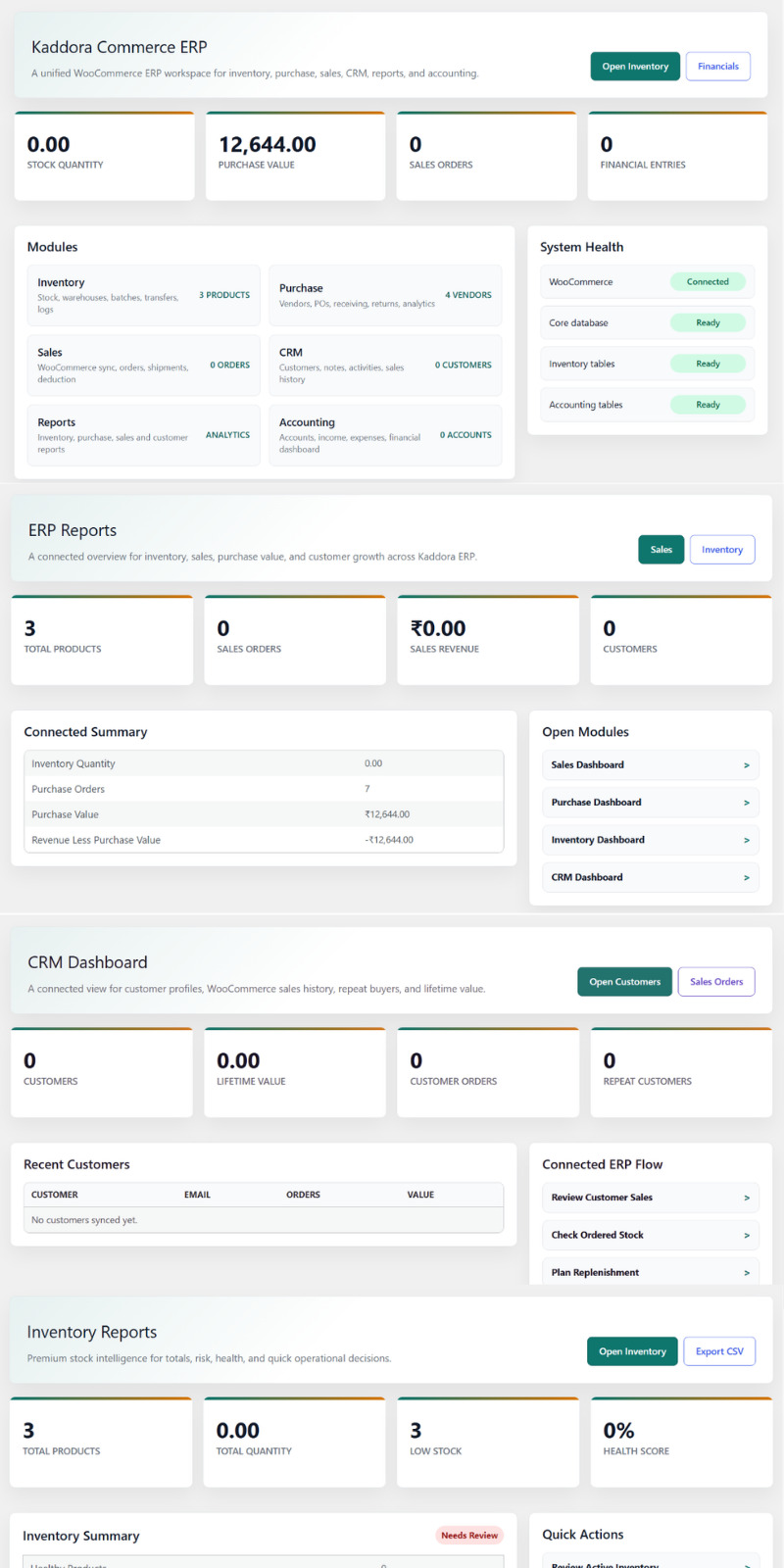
The Kaddora ERP Dashboard is the central command center for ERP operations. It gives administrators a clear overview of inventory, purchasing, sales, CRM, reports, accounting, and system health from one workspace.
- Quick action buttons for Inventory and Financials
- Total stock quantity, purchase value, sales orders, and financial entries
- Module overview for Inventory, Purchase, Sales, CRM, Reports, and Accounting
- Centralized visibility, faster decisions, and improved WooCommerce business control
Settings
The ERP Settings page allows administrators to configure company information, currency preferences, low stock alerts, inventory behavior, and data retention options without editing code.
- Company Name: Business name used in dashboards, reports, and records.
- Default Currency: Currency used for purchase, sales, accounting, and reports.
- Low Stock Alert Quantity: Minimum stock level for low-stock warnings.
- Remove Data on Uninstall: Choose whether to keep or remove ERP data.
Tools
The Tools page provides quick access to maintenance utilities, operational checks, inventory helpers, reports, and accounting functions.
- Inventory Health, Inventory Tools, and Inventory Reports
- Purchase Settings and procurement helpers
- Reports Center for ERP reports and analytics
- Accounting tools for accounts, transactions, and financial records
Inventory Management
The Inventory module provides a centralized view of stock items, quantities, reserved stock, available stock, and product status. It helps administrators monitor stock levels, adjust inventory, manage product availability, track low-stock items, and export inventory data.
- Stock management and inventory dashboard
- Reserved and available quantity tracking
- Low stock monitoring and product status management
- Search, filtering, bulk actions, and stock adjustment tools
- Stock logs, audit trail, batch management, and reservations
- Inventory reports and CSV export
Inventory Warehouses
The Warehouses page allows administrators to manage warehouse locations, monitor warehouse-level stock, and track reserved inventory across multiple storage locations.
- Warehouse management and stock tracking
- Reserved inventory monitoring
- Multiple warehouse support
- Warehouse status management and quick warehouse creation
- Centralized inventory distribution
Inventory Transfers
The Stock Transfer page allows administrators to move inventory between warehouses while maintaining accurate transfer history and traceability.
- Warehouse-to-warehouse inventory movement
- Product quantity transfer management
- Transfer history tracking and stock movement audit trail
- Accurate inventory synchronization
Inventory Reports
The Inventory Reports page provides insights into stock performance, inventory health, product availability, and low-stock risk.
- Inventory performance analytics
- Stock quantity monitoring and low stock detection
- Inventory health scoring and summary reports
- Health check, diagnostics, and CSV report export
Purchase Management
The Purchase Dashboard provides a centralized overview of vendor management, purchase orders, approval status, goods receiving, purchase returns, and procurement performance.
- Vendor management overview and supplier performance insights
- Purchase order tracking and purchase value monitoring
- Order approval status and received order tracking
- Purchase pipeline management
- Vendor analytics and reports
Purchase Orders
The Purchase Orders page allows administrators to create, manage, approve, and track supplier purchase orders throughout the procurement lifecycle.
- Purchase order management and vendor order tracking
- Purchase order items, draft workflow, and approval workflow
- Purchase status and amount tracking
- Search, filtering, and bulk order actions
- Goods receipt management and partial receiving support
Purchase Vendors
The Vendors page provides a centralized supplier database for managing vendor information, contact details, status, and procurement relationships.
- Vendor management and contact information
- Vendor status tracking and supplier database management
- Vendor relationship management
- Quick vendor registration and centralized supplier records
Purchase Returns
The Purchase Returns page helps administrators record returned items, manage supplier returns, and maintain return history for defective, damaged, incorrect, or rejected products.
- Supplier return recording and product return tracking
- Return quantity and reason documentation
- Purchase return history and vendor return monitoring
Sales Management
The Sales Dashboard provides a centralized view of WooCommerce order activity, sales operations, revenue performance, reserved stock, shipment readiness, and order workflow.
- WooCommerce order synchronization
- Sales order monitoring and revenue tracking
- Open order management and reserved stock visibility
- Shipment readiness monitoring
- Inventory deduction and order tracking
Sales Orders
The Sales Orders page manages WooCommerce orders synchronized with the ERP system and helps administrators review sales information, reserve stock, and manage fulfillment from order creation to shipment.
- Sales order management and sales order items
- Customer order tracking and order status monitoring
- Customer and order details
- Stock reservation workflow and shipment management
CRM Management
The CRM module provides a centralized view of customer relationships, sales history, customer value, purchasing behavior, repeat customers, and customer engagement.
- Customer profiles, notes, activities, and sales history
- Customer analytics and lifetime value tracking
- Customer order analytics and repeat customer monitoring
- WooCommerce customer synchronization
CRM Customers
The Customers page displays WooCommerce customer records and helps administrators manage customer information, monitor purchasing behavior, track order history, and analyze customer lifetime value.
ERP Reports
The Reports page provides business metrics across inventory, sales, purchasing, customer management, and accounting. It helps administrators analyze performance, monitor growth, compare module activity, and make data-driven decisions.
- Inventory, purchase, sales, customer, and financial reports
- Business analytics and cross-module reporting
- Sales revenue monitoring and purchase value tracking
- Customer growth insights
- Data export functionality
Accounting
The Accounting Dashboard provides a centralized view of financial performance, account balances, income, expenses, net profit, and recent transactions.
- Income and expense tracking
- Net profit and account balance monitoring
- Recent transaction history
- Purchase-to-accounting and sales-to-accounting integration
- Asset, liability, income, expense, and equity accounts
- Opening balance management and transaction support
- Income, expense, adjustment, reference, and audit trail tracking
Performance and Optimization
Kaddora ERP is designed for performance, scalability, and reliability using optimized custom database tables, efficient indexing, modular loading, AJAX-powered operations, and structured WooCommerce synchronization.
- Optimized database tables and efficient indexing
- Modular architecture that loads only required components
- Lightweight admin interface
- AJAX-powered actions to reduce page reloads
- Optimized WooCommerce synchronization
- Scalable structure for growing businesses
Troubleshooting
- Ensure WordPress and WooCommerce are updated to supported versions.
- Verify required ERP database tables are created successfully.
- Confirm the user account has ERP permissions.
- Check inventory logs if stock quantities appear incorrect.
- Verify purchase orders are received before expecting inventory updates.
- Ensure WooCommerce synchronization is enabled for products, customers, and orders.
- Review accounting accounts and transactions if financial data is missing.
- Clear browser and website cache if dashboard statistics are not updating.
Frequently Asked Questions
What is Kaddora ERP for WooCommerce?
Kaddora ERP is a complete business management solution for WooCommerce that includes Inventory, Purchase, Sales, CRM, Accounting, and Reporting modules.
Does Kaddora ERP require WooCommerce?
Yes. WooCommerce must be installed and activated because the ERP integrates with WooCommerce products, customers, and orders.
Can I manage inventory across multiple warehouses?
Yes. The Inventory module supports warehouse management, stock transfers, inventory tracking, and stock movement monitoring.
Does the plugin support purchase order management?
Yes. You can manage vendors, purchase orders, goods receipts, purchase returns, and procurement workflows.
Are WooCommerce orders synchronized?
Yes. WooCommerce orders can be synchronized into the ERP sales module for order processing, inventory reservation, and reporting.
Does Kaddora ERP include accounting features?
Yes. The Accounting module allows users to manage accounts, transactions, income, expenses, and financial performance.
Can I generate reports and analytics?
Yes. Reports include inventory, purchase, sales, customer, and financial reports to help monitor business performance.
Ideal For
- WooCommerce store owners and growing eCommerce businesses
- Inventory-based businesses, retail stores, and wholesale stores
- Digital agencies managing WooCommerce clients
- Shop managers, warehouse teams, procurement teams, sales teams, and accounting teams
Business Benefits
- Manage operations directly inside WordPress
- Extend WooCommerce with ERP-level business tools
- Centralize inventory, purchase, sales, CRM, accounting, and reports
- Improve stock accuracy and inventory visibility
- Track warehouse movement and stock transfers
- Monitor purchase orders and vendor performance
- Synchronize WooCommerce orders, customers, and products
- Track income, expenses, accounts, and transactions
- Reduce dependence on multiple external business tools
Support and Updates
Kaddora ERP for WooCommerce is designed for long-term use with updates for compatibility, performance, security, module improvements, bug fixes, reporting improvements, and user experience enhancements.
- New ERP features and enhancements
- Security improvements and bug fixes
- Performance optimizations
- WooCommerce and WordPress compatibility updates
- Reporting and analytics improvements
سلام . پس از خرید این محصول میتوانید از منو ناحیه کاربری > دانلود ها اقدام به دانلود قالب نمایید . در صورتیکه در ارتباط با این محصول سوالی دارید میتوانید قبل یا بعد از تهیه محصول با راهنمای آنلاین سایت که در پایین سایت میباشد مشورت بفرمایید . خوشحال خواهیم شد که راهنمای شما باشیم .